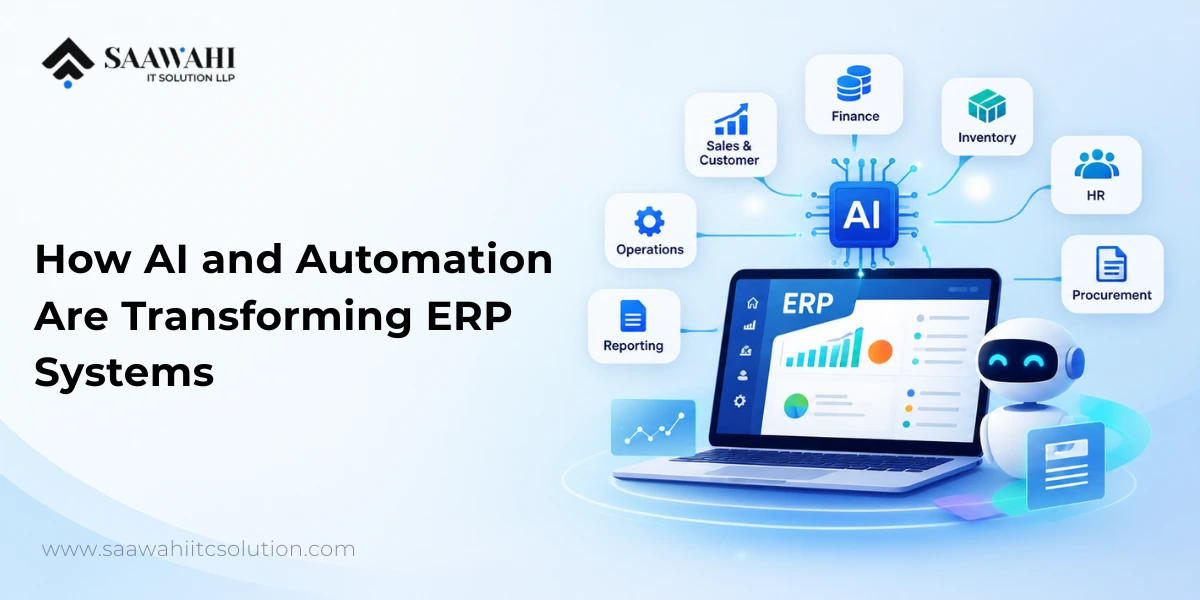
AI-Powered ERP Software: How AI and Automation Are Transforming ERP Systems
Date - 14/09/2026
AI | 13th October
A common mistake in AI automation is starting with the most ambitious version. A team builds an autonomous agent for a job that a five-step workflow would have handled, then spends weeks chasing behavior it can’t reproduce.
The short version: build the workflow first. Reach for an AI agent only when you can’t script the path in advance. This guide explains the difference, gives you a four-question test for choosing, and shows what each option costs to run and where it breaks.
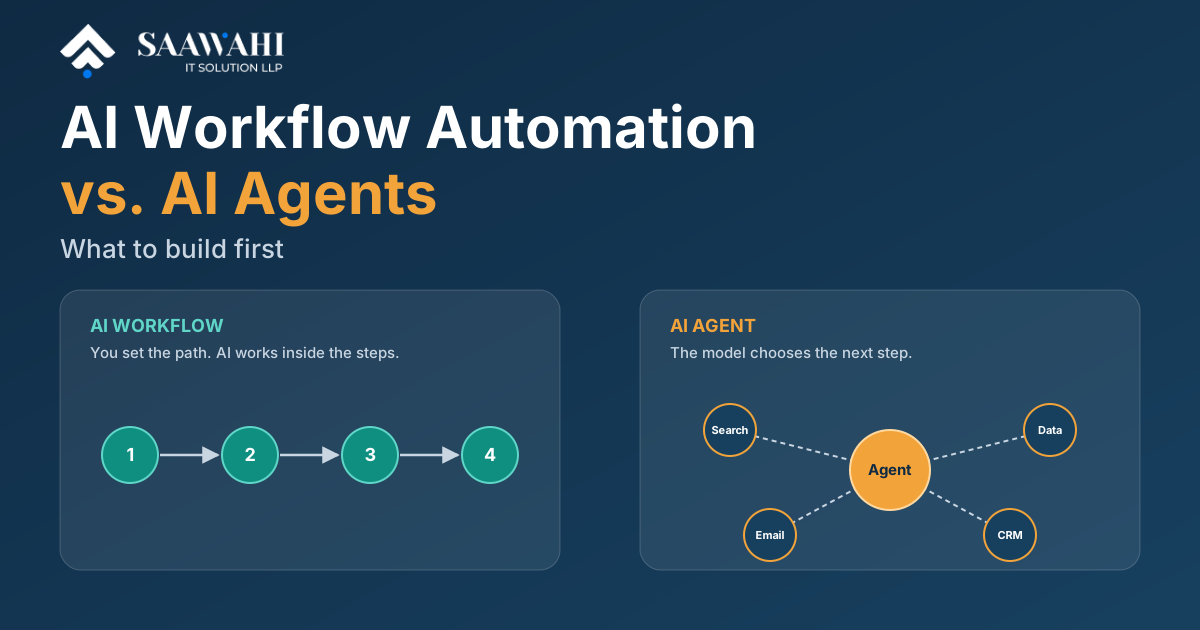
Choose an AI workflow when you can list the steps in advance and they stay mostly the same each run. Choose an AI agent when the next step depends on what the system finds and you can’t script it. Most teams should build the workflow first, then give an agent only the one step that needs judgment.
A quick rule of thumb:
AI workflow automation is a fixed sequence of steps in which one or more steps use an AI model, such as a large language model, to read, classify, extract or draft something. You set the route. The AI does work inside it, but it doesn’t decide where the process goes next.
Take a customer email. It arrives and triggers the workflow. An AI step classifies it as billing, a bug report or a sales question. A routing rule sends it to the right queue. A second AI step drafts a reply, a person approves it, and the CRM is updated. Every step is known in advance, and the same email takes the same path every time.
That predictability is the point. When something goes wrong, you know which step failed. A workflow engine (n8n, Zapier, Make or custom code) handles triggers, integrations and retries, while the AI handles the parts that need interpretation.
If you want a broader look at benefits and department-level use cases, we covered them in How AI Workflow Automation Is Transforming Modern Businesses.
An AI agent is a system where a language model decides its own next steps, choosing which tools to use and when, in a loop until it reaches a goal or hits a limit. You give it an objective and a set of tools. It works out the route.
Anthropic’s engineering team draws the same line in Building effective agents: workflows run LLMs and tools through predefined code paths, while agents direct their own process and tool use. Their advice is to find the simplest solution that works and add complexity only when it’s needed.
Good agent jobs look like this:
If you’re weighing a full agent build, our AI agent development services page covers what that involves, and AI Agents vs. Chatbots explains where chatbots fit.
| Factor | AI workflow | AI agent |
|---|---|---|
| Who controls the path | You, in advance | The model, at run time |
| Same input, same result? | Largely yes | Not guaranteed |
| Cost per run | Predictable: a known number of model calls | Variable: depends on how many steps it takes |
| Debugging | Fails at a known step | Harder: you trace the model’s decisions |
| Time to a reliable version | Faster for well-defined processes | A demo comes quickly; making it dependable takes longer |
| Risk of a wrong action | Lower, bounded by the steps | Higher, needs guardrails and limits |
| Best for | Repeatable processes with messy inputs | Open-ended tasks where steps vary |
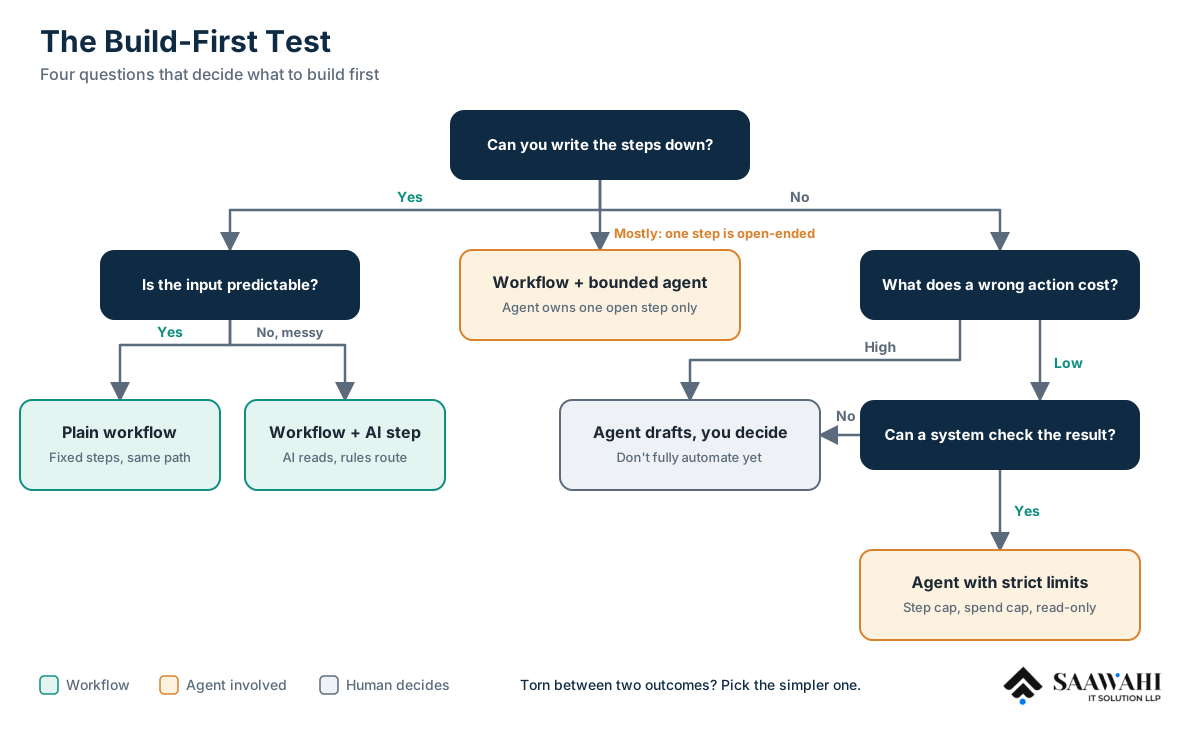
Run the process you want to automate through these four questions.
Then match your answers to a build:
| Your situation | What to build |
|---|---|
| Steps known, input predictable | Plain workflow |
| Steps known, input messy | Workflow with an AI step (extract, classify, draft) |
| Steps mostly known, one open-ended step | Workflow with a bounded agent step |
| Steps unknown, result checkable, mistakes cheap | Agent with strict limits |
| Steps unknown, mistakes costly | Don’t fully automate: the agent drafts, a person decides |
If you’re torn between two rows, pick the simpler one. Adding autonomy later is easy. Taking it away after a bad run is much harder.
These are illustrative scenarios, not client case studies.
An invoice arrives by email. An AI step extracts the vendor, amount and due date. A rule compares the amount with the purchase order. A match goes to the accounting system, and a mismatch goes to a person.
The steps never change, and extraction is the only task that needs AI. This is a workflow, and an agent would only add risk.
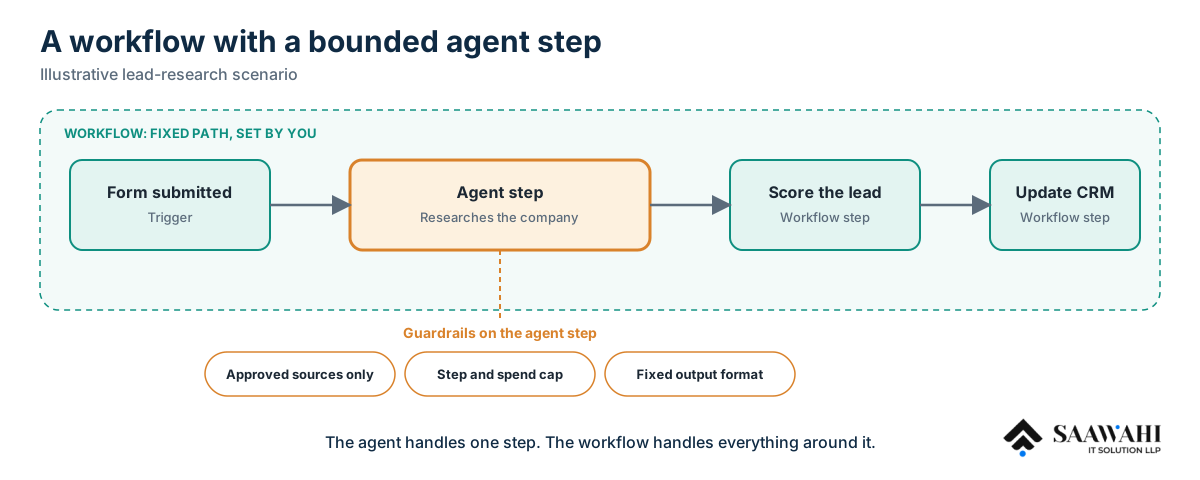
A form submission triggers the workflow. One bounded step hands an agent the job of researching the company across approved sources and returning a structured summary. The workflow then scores the lead and updates the CRM.
The agent has a narrow set of tools, a cap on steps and a fixed output format. The workflow handles everything around it.
An internal assistant looks into an order that didn’t complete. It checks payment status, inventory and shipping records, and the order of those checks depends on what it finds. Each finding can be verified against the source system. It has read-only access and ends by drafting a recommendation, which a person approves.
For more on where agents pay off in operations work, read AI Agents in Back-Office Automation: Real ROI, Real Use Cases. And for a view on what to automate versus keep human, see AI-Powered Legal Work.
Cost is where the two approaches diverge most. A workflow with two AI steps makes two model calls per run, so you can estimate cost before launch. An agent’s cost per run depends on how many steps it takes, which changes from case to case. Platform billing adds another layer: some tools charge per task, some per operation, some per workflow execution, so a looping agent can use up a plan faster than you’d expect.
The tool matters less than the process choice, but it shapes what’s easy to build.
| Tool | Billing unit | Hosting | Fit |
|---|---|---|---|
| Zapier | Per task | Cloud | Simple, linear flows for non-technical teams |
| Make | Per operation | Cloud | Visual branching and more complex logic |
| n8n | Per workflow execution on cloud; free to self-host (you pay for infrastructure) | Cloud or self-hosted | Technical teams, custom code, data control |
All three now include AI features. n8n also has a dedicated AI Agent node and can be self-hosted, which is why technical teams often pick it for agent-style steps. Pricing and features change often, so check each vendor’s current pricing page before you commit.
If you’d rather have experienced engineers build it, you can hire n8n developers from our team.
No. In an AI workflow, you define the path and AI works inside the steps. In an AI agent, the model chooses the path itself. The two are often combined in one system.
Neither is better in general. Workflows are more predictable and cheaper to run, while agents handle open-ended work that can’t be scripted. The strongest systems often use both.
Yes, and it’s often the safest design. The workflow controls intake, approvals and delivery, while the agent handles one bounded step with limited tools.
The term is used loosely. It usually means a workflow where at least one step is run by an agent, or a system where the model plans several steps on its own. Check how a vendor defines it before comparing products.
Use an agent when you can’t script the steps, can verify the results, and mistakes are cheap or reviewable before they cause harm.
It’s a workflow automation platform that also includes an AI Agent node, so you can build both plain workflows and agent-style steps in the same tool.
The real question isn’t workflow or agent. It’s how much autonomy a particular process has earned. Start with fixed steps, measure what happens, and add autonomy only where the evidence supports it.
If you’d like help mapping a process or building your first workflow, Saawahi’s AI workflow automation team works with businesses in the US, Canada and Australia. Talk to us about the process you want to automate first.

Wama Sompura is the CEO of Saawahi IT Solution, leading innovations in AI, automation, and digital solutions that help businesses drive efficiency and growth.
© Copyright 2025 All Rights Reserved. Saawahi IT Solution LLP.