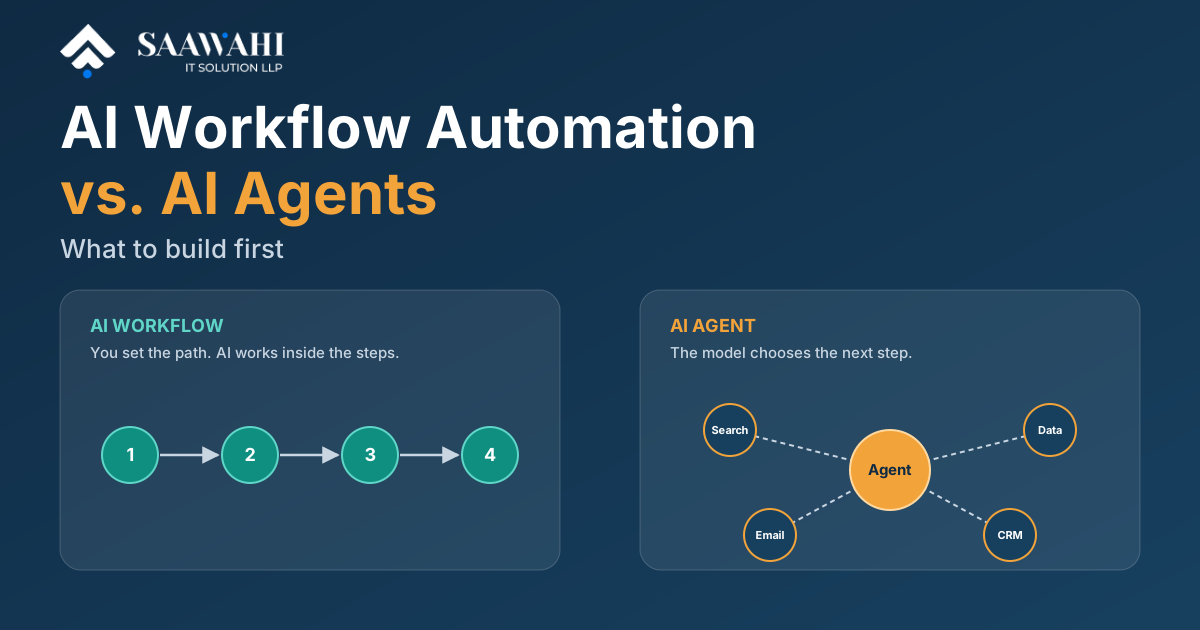
AI Workflow Automation vs. AI Agents: What to Build First
Date - 13/10/2026
AI | 6th July
What started with simple chatbots answering frequently asked questions has quickly evolved into intelligent systems capable of planning tasks, interacting with business applications, and completing complex workflows with minimal human involvement.
Yet, despite this rapid evolution, many businesses still use the terms AI chatbot and AI agent interchangeably.
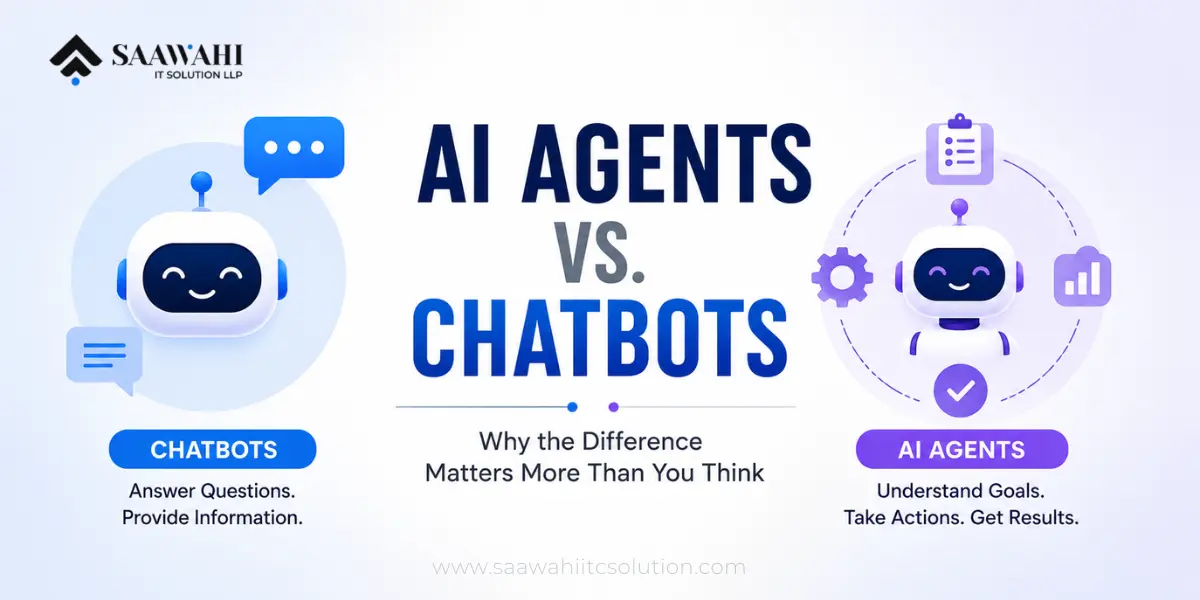
This misunderstanding often leads companies to invest in the wrong technology. A chatbot may improve customer conversations, but it cannot automate an entire business process. On the other hand, an AI agent is designed to go beyond conversation—it can reason, make decisions within defined boundaries, interact with multiple software systems, and execute tasks to achieve a business objective.
The distinction is more important today than ever before. Organizations are no longer looking for AI that simply talks to users; they want AI that works alongside employees, reduces repetitive work, and improves operational efficiency. This shift is driving significant investment in AI agent development and AI automation workflows, helping businesses automate processes that once required hours of manual effort.
In this guide, we’ll explore why AI agents represent the next phase of enterprise automation, how they differ from traditional chatbots, and how businesses can determine which solution best fits their needs.
To understand why AI agents are gaining momentum, it’s helpful to look at how conversational AI has evolved over the years.
The first generation of chatbots relied entirely on predefined rules. They followed scripted conversation paths and responded only to specific keywords or button selections.
For example, if a customer typed “Track my order,” the chatbot could provide a tracking link. However, if the customer asked, “Can you tell me where my package is?” the bot might fail because the wording didn’t match its predefined rules.
These chatbots were affordable and easy to deploy but struggled with natural conversations and unexpected questions.
Advances in Natural Language Processing (NLP) enabled chatbots to better understand user intent instead of relying solely on exact keyword matches.
Businesses began using AI chatbots for:
The introduction of Large Language Models (LLMs) made conversations even more natural. Chatbots could now answer complex questions, summarize information, and provide contextual responses that felt more human.
For many organizations, this significantly improved customer experience while reducing support costs.
However, one major limitation remained.
These chatbots were excellent at providing information but not at taking meaningful action.
Imagine a customer says:
“I’d like to change my delivery address and postpone tomorrow’s shipment.”
A modern chatbot might explain the process or direct the customer to a support page.
But it typically cannot:
Someone from the operations team still has to complete those tasks manually.
This is exactly where AI agents come into the picture.
An AI chatbot is designed to communicate with users through text or voice. Its primary goal is to answer questions, assist users, and guide conversations.
Think of it as a highly knowledgeable customer service representative available 24/7.
Modern chatbot development services typically include features such as:
Businesses across industries use chatbots to improve response times and provide instant assistance without increasing support staff.
In all these examples, the chatbot’s responsibility is centered on communication rather than execution.
As businesses grow, so does the complexity of their operations.
Customer requests often involve multiple departments, business applications, approval processes, and compliance checks.
Consider a sales inquiry.
A prospective customer visits your website and asks for pricing.
Responding with a brochure is only one small part of the process.
A sales representative may also need to:
Traditional chatbots cannot coordinate this sequence of activities because they are not designed to manage business workflows.
The same limitation appears in HR, finance, legal, logistics, and manufacturing departments.
Employees often spend hours switching between emails, spreadsheets, ERP systems, CRMs, document management platforms, and collaboration tools just to complete one business process.
These repetitive, multi-step activities consume valuable time and increase the likelihood of human error.
This growing operational complexity has led organizations to look beyond conversational AI and adopt intelligent automation.
Unlike chatbots, AI agents are designed with a fundamentally different objective.
Instead of simply responding to user input, an AI agent works toward achieving a specific goal.
Imagine assigning a task to a capable team member rather than asking a receptionist for information.
For example:
“Review all support tickets submitted today, identify urgent cases, assign them to the correct engineers, notify customers about the expected resolution time, and prepare a daily summary for management.”
An AI chatbot can explain how support tickets work.
An AI agent can actually complete the workflow.
It understands the objective, determines the required steps, interacts with multiple business systems, and executes the process while keeping humans informed when necessary.
This ability to combine reasoning, planning, and execution is what makes AI agent development one of the fastest-growing areas in enterprise AI.
Rather than replacing employees, AI agents handle repetitive operational work, allowing teams to focus on strategic decisions, customer relationships, and innovation.
Businesses are no longer asking:
“Can AI answer customer questions?”
Instead, they’re asking:
These are workflow challenges—not conversation challenges.
And solving them requires a different type of AI.
That different type is the AI agent.
The biggest misconception about AI agents is that they’re simply “smarter chatbots.” In reality, they represent a different approach to using AI in business.
A chatbot is designed to respond.
An AI agent is designed to achieve an objective.
Imagine you ask both systems the same request:
“Prepare a proposal for this client and schedule a meeting next week.”
A chatbot might generate a proposal template and suggest available meeting times.
An AI agent, however, can:
The interaction ends with the chatbot’s response.
The AI agent’s work begins with your request.
Modern AI agents combine several technologies to perform work rather than just generate text.
Instead of responding to one prompt at a time, AI agents break a goal into multiple smaller tasks.
For example:
Goal: Onboard a new employee.
The agent determines that it must:
This planning capability allows the agent to execute complex business processes.
Most chatbots remember only the current conversation or a limited amount of context.
AI agents can maintain both short-term and long-term memory.
For example, an AI sales agent may remember:
This enables far more personalized and effective interactions.
This is where AI agents become truly valuable.
Instead of existing in isolation, they connect with the software businesses already use.
Examples include:
Rather than telling an employee how to perform a task, the agent performs it directly.
AI agents can make routine decisions based on predefined business rules.
Examples include:
Humans still remain in control of critical decisions, but agents significantly reduce manual intervention for repetitive work.
The difference becomes much clearer when viewed through the lens of business operations.
| Capability | AI Chatbot | AI Agent |
|---|---|---|
| Primary role | Conversational assistance | Goal-oriented task execution |
| Main focus | Answering questions | Completing workflows |
| Decision-making | Limited | Context-aware and rule-driven |
| Uses business software | Basic integrations | Deep integration across systems |
| Multi-step tasks | Limited | Native capability |
| Memory | Session-based | Persistent and contextual |
| Human supervision | Frequent | Exception-based |
| Business impact | Better customer communication | End-to-end process automation |
In simple terms:
A chatbot helps people work faster.
An AI agent helps businesses work smarter.
Businesses rarely lose productivity because employees lack knowledge.
They lose productivity because work is fragmented.
A typical process often involves:
Employees spend a significant portion of their day switching between applications instead of completing meaningful work.
This is where AI automation workflows deliver real value.
Instead of automating individual tasks, they automate the entire process.
Let’s compare a traditional workflow with an AI-powered one.
A visitor fills out a contact form.
The marketing team:
Depending on workload, this may take several hours—or even days.
An AI agent:
What once required multiple manual steps can now be completed in minutes, with human involvement only where necessary.
This is the true value of AI automation: not replacing people, but eliminating repetitive operational work.
Large organizations aren’t investing in AI agents because they’re the latest trend—they’re investing because they address longstanding operational challenges.
Across departments, employees spend considerable time on repetitive tasks such as:
These activities are necessary but rarely create strategic value.
By automating routine processes, AI agents allow employees to focus on higher-impact work such as innovation, customer relationships, and business growth.
For organizations already using CRM, ERP, or project management platforms, AI agent development provides a way to unlock greater value from existing technology investments rather than replacing them.
One of the most common questions business leaders ask is, “Should we replace our chatbot with an AI agent?”
The answer is: not necessarily.
Chatbots and AI agents solve different problems, and in many organizations, they work best together rather than replacing one another.
Think of it this way:
For example, consider an e-commerce business.
A customer types:
“I’d like to return the shoes I purchased last week.”
A chatbot can understand the request and ask a few follow-up questions.
An AI agent can then:
To the customer, it feels like one seamless conversation. Behind the scenes, however, the chatbot handles communication while the AI agent executes the business process.
This combination delivers a better customer experience and significantly reduces manual work for support teams.
A chatbot is often the right choice if your primary goal is improving communication rather than automating operations.
Typical use cases include:
For startups and small businesses, chatbot development services can provide immediate value by improving response times and reducing the workload on customer support teams.
If your employees spend hours every week performing repetitive administrative tasks, it’s a strong indication that an AI agent could deliver measurable value.
Consider AI agent development if your business regularly performs activities such as:
The greater the number of repetitive, rule-based workflows in your organization, the greater the potential return on investment from AI agents.
As interest in AI grows, many organizations rush into implementation without a clear strategy. This often leads to disappointing results.
Here are some of the most common mistakes—and how to avoid them.
Not every business process requires an AI agent.
Simple tasks like answering FAQs or directing users to the right information can often be handled effectively by a chatbot. Deploying an advanced AI agent for these scenarios may increase costs without delivering additional value.
The best approach is to match the technology to the business need.
AI can accelerate work, but it cannot fix poorly designed workflows.
Before introducing AI, organizations should review existing processes, remove unnecessary steps, and standardize how work is performed. Automating an inefficient process simply allows mistakes to happen faster.
An AI agent is only as reliable as the information it receives.
If customer records are incomplete, documents are inconsistent, or systems contain outdated data, the AI may produce inaccurate results. Investing in data quality and governance is essential for successful automation.
Despite their advanced capabilities, AI agents should not operate without oversight in high-risk scenarios.
Financial approvals, legal decisions, healthcare recommendations, and regulatory compliance often require a human-in-the-loop approach. AI should assist professionals, not replace critical judgment.
While reducing operational costs is important, businesses should also evaluate:
These broader outcomes often provide greater long-term value than cost reduction alone.
Implementing AI isn’t just about deploying a language model or adding a chatbot to your website. The real challenge lies in integrating AI with your existing processes, systems, and business goals.
At Saawahi IT Solution, we help organizations design and implement AI solutions that deliver measurable business outcomes—not just impressive demonstrations.
Our expertise includes:
Rather than offering one-size-fits-all solutions, we begin by understanding your business workflows. This enables us to identify where AI can create the greatest impact—whether it’s reducing manual effort, improving response times, or enhancing customer experiences.
Whether you’re a startup exploring AI for the first time or an enterprise looking to modernize complex operations, our team focuses on building scalable, secure, and practical AI solutions that align with your long-term business objectives.
The conversation around AI has evolved.
A few years ago, businesses wanted chatbots that could answer customer questions. Today, they want intelligent systems that can execute work, collaborate with employees, and automate end-to-end business processes.
This shift marks the rise of agentic AI—a new generation of systems capable of reasoning, planning, and acting across multiple applications.
However, this doesn’t mean chatbots are becoming obsolete.
Instead, the future lies in combining conversational AI with intelligent automation. Chatbots will continue to serve as the interface between users and businesses, while AI agents operate behind the scenes to complete tasks, coordinate workflows, and deliver outcomes.
Organizations that adopt this integrated approach will be better positioned to improve productivity, reduce operational complexity, and deliver faster, more personalized customer experiences.
The distinction between AI chatbots and AI agents is no longer just a technical discussion—it’s a strategic business decision.
Chatbots remain invaluable for customer communication, self-service, and information delivery. They enhance user experiences by providing instant responses and reducing the burden on support teams.
AI agents, however, represent the next stage of business automation. By combining reasoning, memory, system integrations, and workflow execution, they transform AI from a conversational assistant into an operational partner.
Rather than asking “Which technology is better?”, businesses should ask “Which technology solves our biggest operational challenge?”
For organizations focused on efficiency, scalability, and digital transformation, the answer often isn’t choosing one over the other—it’s leveraging both where they create the most value.
As AI continues to evolve, businesses that invest in thoughtful, goal-driven automation today will be better equipped to compete in tomorrow’s increasingly intelligent digital economy.
An AI chatbot is designed to interact with users by answering questions and guiding conversations. An AI agent goes further by understanding goals, making decisions within predefined rules, integrating with business systems, and executing multi-step workflows.
Not entirely. Chatbots remain highly effective for customer communication and self-service. AI agents complement them by automating backend processes and business operations. Many organizations benefit from using both together.
Industries with repetitive, process-driven operations—such as healthcare, finance, legal, manufacturing, logistics, retail, and real estate—can achieve significant productivity gains through AI agent development and workflow automation.
No. Small and medium-sized businesses can also benefit by automating repetitive tasks such as lead management, appointment scheduling, invoice processing, and customer support. Starting with a single high-impact workflow is often the most effective approach.
AI automation workflows reduce manual effort by connecting multiple systems and automating repetitive tasks across departments. This leads to faster processing, fewer errors, improved compliance, and better employee productivity.
Saawahi IT Solution provides end-to-end AI services, including AI agent development, chatbot development services, AI automation workflow design, system integrations, and custom software solutions tailored to your business requirements.

Wama Sompura is the CEO of Saawahi IT Solution, leading innovations in AI, automation, and digital solutions that help businesses drive efficiency and growth.
© Copyright 2025 All Rights Reserved. Saawahi IT Solution LLP.